
Are Electronic Signatures Legally Binding?
For most business documents, yes. In the United States the ESIGN Act and UETA give electronic signatures the same standing as handwritten ones; the EU's eIDAS regulation and UK law do the same for most agreements. There are exceptions, such as wills and some property and court documents, and what makes a signature hold up is being able to show who signed, that they meant to, and that the document has not changed.
This is general information, not legal advice. For a specific document, check with a lawyer where you are.
What makes an electronic signature hold up
- Intent to sign. The person clearly chose to sign: they drew, typed or clicked to sign, knowing it was a signature.
- Consent to do business electronically. Both sides agreed to sign this way.
- A link between the signature and the document. The signature is tied to that exact version.
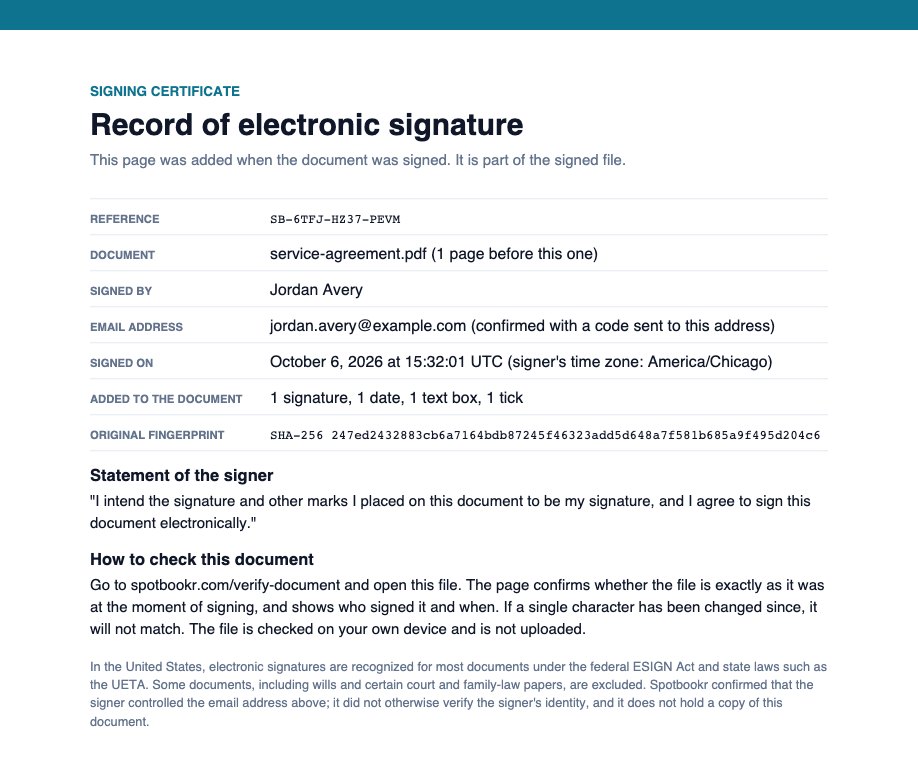
- A record. Who signed, their email, when, and proof the document has not been altered since.
Common exceptions
Depending on where you are, these often still need ink or a witness: wills and trusts, some property deeds, court documents, and certain notices such as utility shut-offs. If in doubt, ask.
Documents small businesses commonly sign electronically
- Customer contracts and service agreements
- Estimates and quotes, accepted with a signature
- Non-disclosure agreements
- Employment offers and contractor agreements
- Lease and rental agreements, in most places
- Purchase orders and supplier agreements
- Consent and waiver forms
What a good signing record shows
If a signature is ever questioned, these are the facts that matter:
- Who signed: their name and the email address the request went to
- When: the date and time of signing
- What exactly they signed: a fingerprint of the document, so any later change is detectable
- That they meant to sign: the step where they chose to sign, not just opened the file
Practical tips
- Send to an email address you already know belongs to the person, especially for contracts.
- Keep the signed copy and its record together, somewhere you can find them years later.
- Make the document final before you send it. Changing it afterwards means signing again.
- For anything unusual or high-value, ask a lawyer whether extra steps such as witnesses or identity checks are needed.
Electronic signatures around the world, in brief
- United States: the federal ESIGN Act and state laws based on UETA recognise electronic signatures for most transactions. Some documents, such as wills and certain court and property documents, have their own rules.
- European Union: the eIDAS regulation recognises three levels: simple, advanced and qualified electronic signatures. A simple electronic signature is valid for most business contracts; a qualified one is treated the same as a handwritten signature everywhere in the EU.
- United Kingdom: electronic signatures are recognised for most documents, and courts have accepted typed names and clicks where intent was clear. Deeds and some property documents have extra requirements.
- Canada and Australia: both have electronic transactions laws that recognise electronic signatures for most purposes, with exceptions for some documents.
Rules also vary within countries, and change. For anything unusual, high-value or across borders, check with a lawyer.
Simple, advanced, qualified: which do you need?
Most small-business contracts, estimates and agreements only need a simple electronic signature with a good record. Advanced signatures add stronger links to the signer's identity; qualified ones use a certificate from an approved provider. You would normally only need those where a law or the other party specifically requires them.
A worked example
A cleaning company signs annual service contracts with offices. They used to print, sign, scan and email contracts back and forth, which took a week and occasionally lost a page.
Now they send each contract as a PDF to the office manager's work email to sign electronically. The office manager signs on her phone in two minutes. The cleaning company receives the signed file with a record of who signed, the email it was sent to, the time, and a fingerprint of the document.
Months later the client disputes a price in the contract. The company shows the signed file; the fingerprint check confirms it is exactly the version that was signed. The dispute ends there.
Quick checklist
- The document is final before it is sent for signature
- It goes to an email address you know belongs to the signer
- The signer clearly chooses to sign
- You keep the signed file and its signing record together
- Documents with special rules (wills, some property deeds) are handled the traditional way
Key terms
- Electronic signature: any electronic sound, symbol or process a person adopts to sign a document, such as a typed name, a drawn signature or a click.
- ESIGN Act and UETA: the US laws that give electronic signatures the same legal standing as handwritten ones for most transactions.
- eIDAS: the EU regulation on electronic signatures, which defines simple, advanced and qualified signatures.
- Document fingerprint: a short code calculated from a file; if the file changes at all, the code changes.
How to do it in Spotbookr
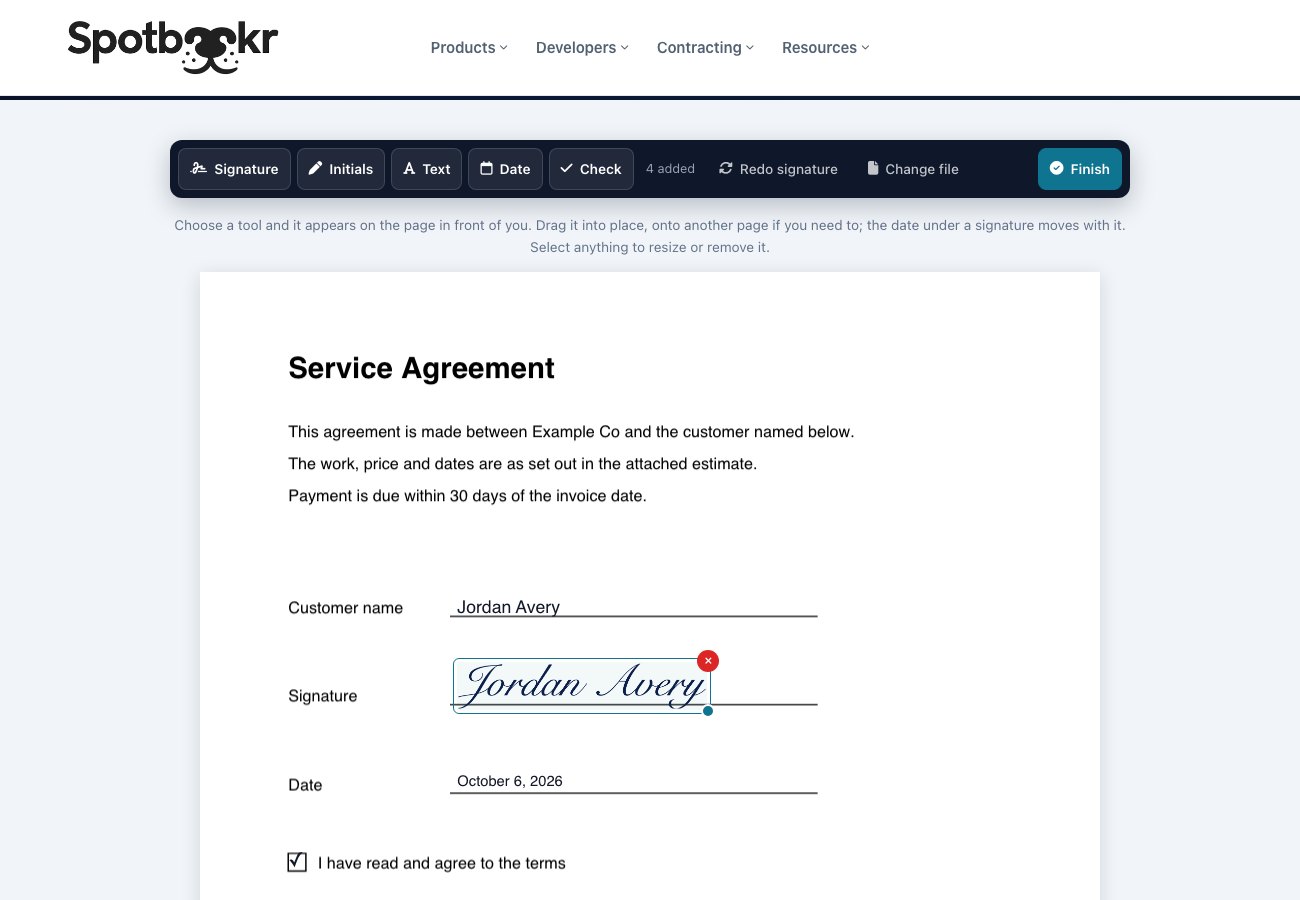
With Document Signing, you can sign a PDF yourself or send it to someone to sign. They receive a link, sign, and you are told when it is signed or declined. The signed file is kept in your account.
Every signed file comes with a signing record: who signed, their email, the time, and a fingerprint of the document.
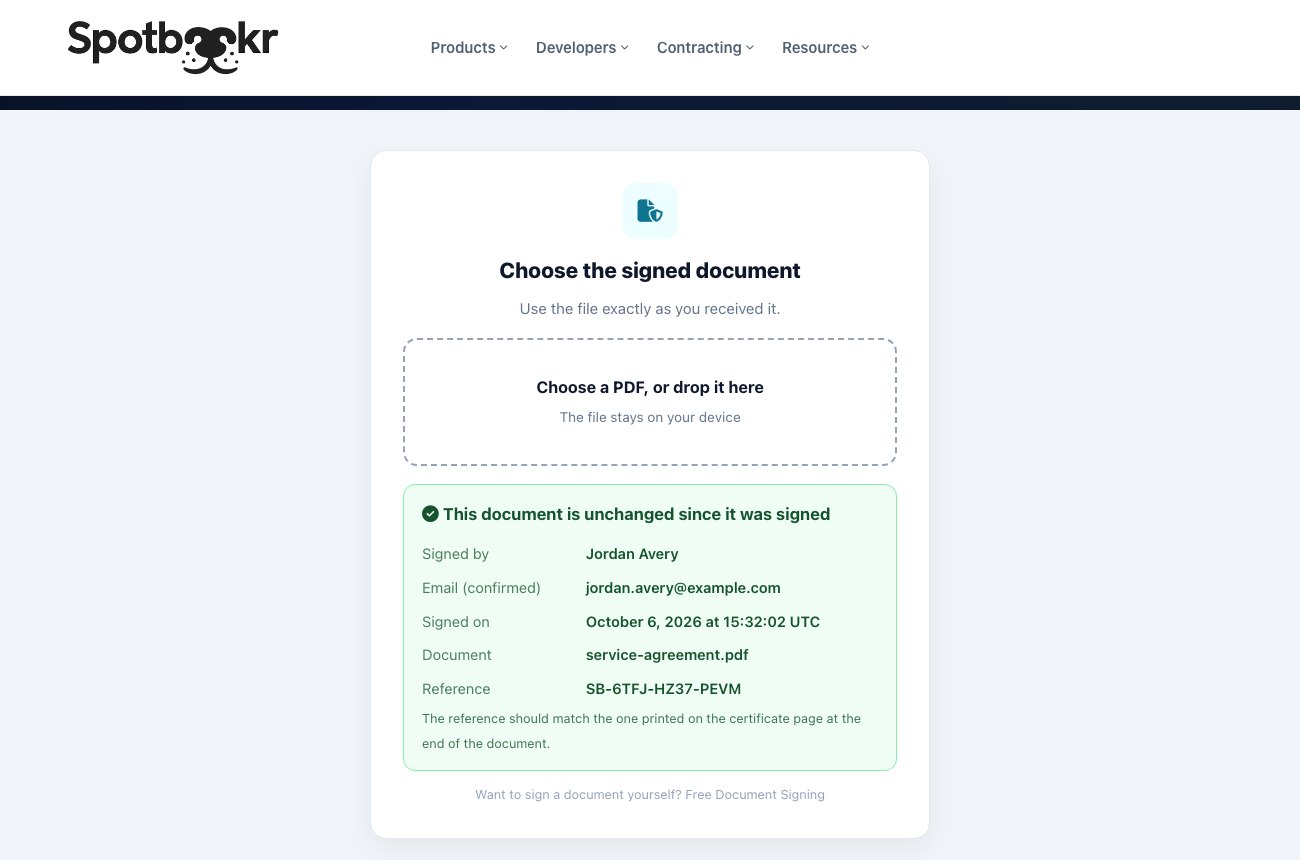
Anyone holding the file can check it on the Verify a Document page: if a single character of the document changed after signing, the check fails.
Spotbookr does not verify a signer's identity and is not a notary. When identity matters, confirm it another way, for example by sending the request to an email address you already know is theirs.
Related questions
Is a scanned signature the same as an electronic signature?
It can count as one, but a pasted image proves little on its own. A signing record that ties the signature to the signer and the exact document is much stronger evidence.
What is the difference between an electronic and a digital signature?
"Electronic signature" is the broad legal term for any electronic way of signing. "Digital signature" usually means one secured with cryptography, such as a document fingerprint, which shows the file has not changed.
Can a contract be signed on a phone?
Yes. Signing on a phone is as valid as signing on a computer, as long as the same conditions are met.
Do both parties need to sign electronically?
No. One can sign electronically and the other on paper, as long as both signatures are on the same final document and both agreed to the method.
How long should I keep signed documents?
At least as long as the agreement lasts plus the time your local law allows for claims, often several years. Check with your accountant or lawyer for your situation.
Can a minor sign an agreement electronically?
The rules on contracts with minors apply however they are signed. Check local law, and get a parent or guardian's signature where it is required.
Do I need a notary for an electronic signature?
Most business documents do not. Some documents legally require notarisation; for those, use a notary service that supports them.
More in the Help Center: Sign documents and send them for signature. You can also try Spotbookr with sample data.