
Product Update: Zoom Links on Every Meeting, and a Compact CRM
Two things kept slowing down our own days: copying a Zoom link into every calendar invite, and scrolling past one tall card after another to see the pipeline. We run Spotbookr on Spotbookr, so we fixed both. This update connects Zoom to Scheduling and gives the CRM a compact layout.
Zoom Links, Made for You
Until now, booking a call meant two steps: put the meeting in the calendar, then go to Zoom, make a meeting and paste the link back in. Now the calendar does the second step.
- Connect your own Zoom once. Under Account, Connections, choose Connect Zoom and approve it in Zoom. Each person connects their own account, so a meeting is hosted by whoever is running it.
- A new link for every meeting. Every appointment or meeting of yours that has no place set gets its own Zoom meeting automatically. The join link goes into the confirmation email, the calendar invite, the booking page and the copy on your Google or Outlook calendar.
- It keeps up with changes. Move a meeting and its Zoom meeting moves with it. Cancel it and the Zoom meeting is deleted.
- You stay in control. Give a meeting its own place, such as an address, a phone number or another link, and it gets no Zoom meeting. You can switch automatic Zoom links off at any time.

Rolling out: Zoom reviews every app that connects to it. We are using Zoom with our own team today, and connecting your account opens to every Spotbookr customer as soon as Zoom completes its review. You will see Connect Zoom under Account, Connections when it is ready for you.
A Compact CRM
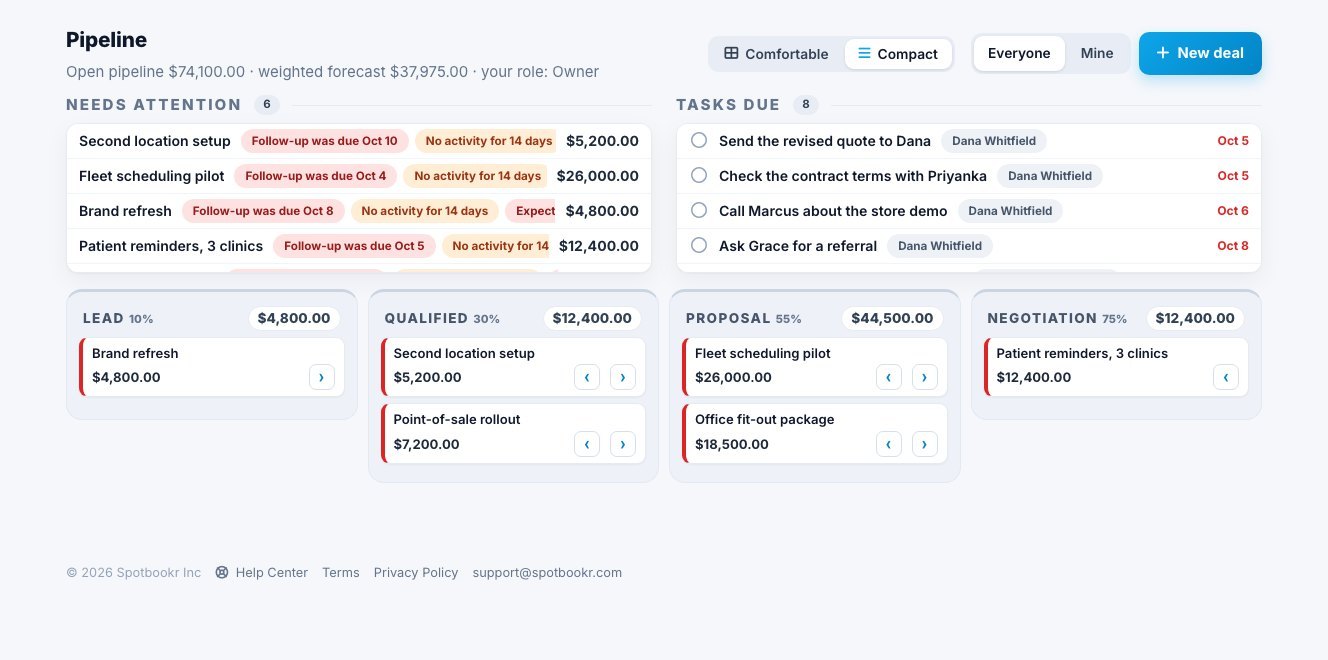
A pipeline with a few dozen deals should not take five screens to read. The CRM now has a layout switch at the top of the Pipeline, Deals, Contacts, Companies and Reports pages.
- Compact shows each deal on one line with its value, keeps Needs attention and Tasks due to a short list you can scroll, and tightens the rows on every list.
- Comfortable is the layout you know, with tags, the company and the next step on every card.
- Your choice is remembered for you, on every device, and does not change what anyone else on your team sees.
More improvements are coming soon.